
Meet Brushy
A smart toothbrush app for your dumb toothbrush

Brushy is like the app that comes with your smart toothbrush, but you don’t need an expensive connected toothbrush; any old toothbrush will do. Brushy was built using the Trail Framework, a development framework designed to work with any combination of humans and AI.
I designed Trail after building TrekCrumbs and running into the same problem over and over: AI writes solid code, but it’s a terrible architect. It drifts. It fills gaps. It decides things it shouldn’t. Trail exists to fix that.
Instead of prompts, Trail uses clear intent and role separation. Who decides, who plans, who builds, and who reviews are never the same role. Everything is written in plain English. No magic. No hidden context. Just files that a human can read and audit.
Brushy took about 3 hours end-to-end:
~2.5 hours defining intent
~30 minutes for AI to plan, build, and test
That ratio is intentional.
Brushy wasn’t meant to be a product. It was a proof-of-concept for Trail. Turns out, when your intent is clear, and your execution is clean, the line between “demo” and “product” gets pretty thin.
Trail doesn’t make AI smarter. It keeps intent intact when execution gets cheap.
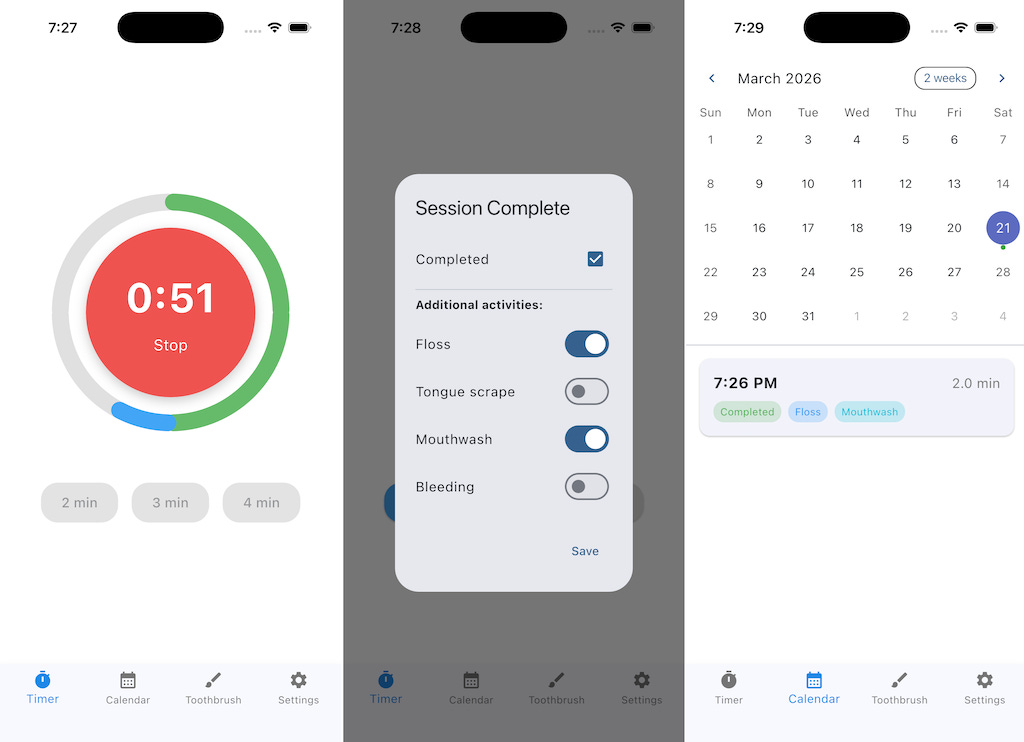
The actual intent used and screenshots, are below.
Brushy was created with an early version of Trail, called ADF, but the bones are the same.
Images
Video
intent.md
# Intent — Brushy v1.2 (Executable)

## Purpose
Build **Brushy v1.2**, a Flutter mobile app that provides a tooth-brushing timer and records timer sessions for personal tracking.

Brushy tracks **timer sessions**, not brushing correctness, technique, or health outcomes.

## Platform / Stack
- Flutter mobile app (iOS + Android)
- Offline-first
- No backend services

## Navigation / Screens (Layout)
Bottom navigation with 4–5 tabs:
- Timer
- Calendar
- Toothbrush
- Settings
- About/Help (can be combined with Settings if needed)

## Timer Screen
- Circular countdown timer
- Start/Stop button in the center
- Duration options: 2, 3, 4 minutes
- No coaching guidance, no brushing order, no scoring

### Progress Ring Segmentation
- The countdown ring is divided into **4 equal visual segments (quarters)** for **all** timer durations (2/3/4 minutes).
- Segments are **visual pacing only** (no labels, no brushing guidance, no implied order).
- Progress advances evenly through all four segments over the total duration.

### Segment Transition Feedback
- The user must receive **clear feedback** at each segment boundary indicating it is time to move to the next segment.
- Feedback mechanism is **implementation-defined** (e.g., haptic, sound, visual), but must be noticeable.

## Post-Stop Modal
- Shown after stop or background stop
- Background stop shows message explaining timer stopped
- Checkbox: Completed
- Toggles:
  - Floss
  - Tongue scrape
  - Mouthwash
  - Bleeding
- Toggles default false
- Completed defaults:
  - true on natural finish
  - false on early stop or background stop

## Calendar Screen
- Shows one marker per session per day
- Empty circle: 10–29 seconds
- Dot: ≥30 seconds
- Amber dot: <80% planned duration
- Supports multiple sessions per day
- Tap a day to view the sessions for that day

## Session Recording Rules
- <10s: no record
- 10–29s: record, empty circle
- ≥30s: record
- Amber if actualDuration < plannedDuration * 0.80
- Backgrounding stops timer immediately

## Time Handling
- Store timestamps in UTC
- Display in device timezone
- File named by local date at session start
- Filename format: `YYYY-MM-DD.json`

## Data Storage

### Vault Layout
```
brushy/
├─ settings.json
├─ toothbrush.json
└─ data/
    └─ YYYY-MM-DD.json

### Cloud Storage Requirement (Native, Mobile-Only)
- iOS: Data must be stored using **native iCloud-backed storage** (e.g., iCloud-synced app documents or OS-managed cloud backup).
- Android: Data must be stored using a **Google-native cloud mechanism** (e.g., Google Drive app data, OS backup, or user-selected Drive location).
- Saving must be automatic during normal app usage.
- A **one-time permission grant or account selection** is acceptable.
- No custom backend, sync service, or user account system may be introduced.
- Folder structure and exact storage mechanism are **implementation-defined**.

### Required Decision Documentation
- The implementation must document (in `results.md`):
  - Which cloud storage mechanism was chosen per platform
  - Any required user interaction (if applicable)
  - Key implementation decisions or assumptions made

### Daily File Structure
Each daily file contains:
- date
- sessions[] with:
  - sessionId (UUID)
  - startUtc
  - endUtc
  - plannedDurationSec (120 / 180 / 240)
  - actualDurationSec
  - completed
  - floss
  - tongueScrape
  - mouthwash
  - bleeding

## Toothbrush Tracking
- Track install/replacement date
- Replacement reminder based on configurable ADA interval

## Constraints / Non-Goals
- No accounts
- No subscriptions
- No ads
- No gamification
- No coaching
- No health scoring
- No custom sync or backend services
- No crash recovery beyond background-stop behavior

## Acceptance Criteria
- Timer runs and stops correctly
- Ring displays four quarters for all durations
- User receives noticeable feedback at each quarter boundary
- Sessions recorded according to rules
- Calendar displays session history correctly
- Session details are accessible
- Data persists via JSON vault
- Data is cloud-backed using native platform mechanisms (iOS: iCloud, Android: Google)
- Implementation decisions are documented in `results.md`